
Elysia
1,837,294 reqs/sHono
740,451
以每秒请求数测量。结果来自 TechEmpower 基准测试 第 23 轮(2025-02-24)中的 JSON 序列化
title: 从 Hono 迁移 - ElysiaJS prev: text: '快速开始' link: '/quick-start' next: text: '教程' link: '/tutorial' head: - - meta - property: 'og:title' content: 从 Hono 迁移 - ElysiaJS
- - meta
  - name: 'description'
    content: 本指南面向 Hono 用户,旨在帮助他们了解 Elysia 在语法等方面的差异,并通过示例演示如何将应用程序从 Hono 迁移到 Elysia。

- - meta
  - property: 'og:description'
    content: 本指南面向 Hono 用户,旨在帮助他们了解 Elysia 在语法等方面的差异,并通过示例演示如何将应用程序从 Hono 迁移到 Elysia。
本指南面向 Hono 用户,旨在帮助他们了解 Elysia 在语法等方面的差异,并通过示例演示如何将应用程序从 Hono 迁移到 Elysia。
Hono 是一个基于 Web 标准构建的快速、轻量级 Web 框架。它与多种运行时(如 Deno、Bun、Cloudflare Workers 和 Node.js)具有广泛的兼容性。
Elysia 是一个符合人体工程学的 Web 框架。其设计注重健全的类型安全和性能,旨在为开发者提供友好体验。
两个框架都基于 Web Standard API 构建,但语法略有不同。Hono 提供了与多种运行时更广泛的兼容性,而 Elysia 则专注于特定的运行时集。
得益于静态代码分析,Elysia 在性能上相较于 Hono 有显著提升。
740,451
以每秒请求数测量。结果来自 TechEmpower 基准测试 第 23 轮(2025-02-24)中的 JSON 序列化
Hono 和 Elysia 具有相似的路由语法,使用 app.get() 和 app.post() 方法定义路由,并采用类似的路径参数语法。
两者都使用单个 Context 参数来处理请求和响应,并直接返回响应。
import { Hono } from 'hono'

const app = new Hono()

app.get('/', (c) => {
    return c.text('Hello World')
})

app.post('/id/:id', (c) => {
	c.status(201)
    return c.text(req.params.id)
})

export default app
Hono 使用辅助函数
c.text,c.json来返回响应
import { Elysia } from 'elysia'

const app = new Elysia()
    .get('/', 'Hello World')
    .post(
    	'/id/:id',
     	({ status, params: { id } }) => {
      		return status(201, id)
      	}
    )
    .listen(3000)
Elysia 使用单个
context并直接返回响应
虽然 Hono 使用 c.text 和 c.json 来包装响应,但 Elysia 会自动将值映射为响应。
在代码风格上略有不同,Elysia 推荐使用方法链和解构赋值。
Hono 的端口分配依赖于运行时和适配器,而 Elysia 使用单一的 listen 方法来启动服务器。
Hono 使用函数手动解析查询、标头和请求体,而 Elysia 会自动解析属性。
import { Hono } from 'hono'

const app = new Hono()

app.post('/user', async (c) => {
	const limit = c.req.query('limit')
    const { name } = await c.body()
    const auth = c.req.header('authorization')

    return c.json({ limit, name, auth })
})
Hono 会自动解析 body,但这不适用于 query 和 headers
import { Elysia } from 'elysia'

const app = new Elysia()
	.post('/user', (ctx) => {
	    const limit = ctx.query.limit
	    const name = ctx.body.name
	    const auth = ctx.headers.authorization

	    return { limit, name, auth }
	})
Elysia 使用静态代码分析来决定要解析什么
Elysia 使用静态代码分析来确定要解析的内容,并且只解析所需的属性。
这对于性能和类型安全很有用。
两者都可以将另一个实例作为路由继承,但 Elysia 将每个实例视为一个组件,该组件可用作子路由。
import { Hono } from 'hono'

const subRouter = new Hono()

subRouter.get('/user', (c) => {
	return c.text('Hello User')
})

const app = new Hono()

app.route('/api', subRouter)
Hono 需要前缀来分离子路由
import { Elysia } from 'elysia'

const subRouter = new Elysia({ prefix: '/api' })
	.get('/user', 'Hello User')

const app = new Elysia()
	.use(subRouter)
Elysia 使用可选的前缀构造函数来定义一个
虽然 Hono 需要前缀来分离子路由,但 Elysia 不需要。
虽然 Hono 通过外部包支持各种验证器,但 Elysia 内置了使用 TypeBox 的验证,并开箱即用地支持 Standard Schema,允许您使用您喜欢的库(如 Zod、Valibot、ArkType、Effect Schema 等)而无需额外的库。Elysia 还提供了与 OpenAPI 的无缝集成和幕后的类型推断。
import { Hono } from 'hono'
import { zValidator } from '@hono/zod-validator'
import { z } from 'zod'

const app = new Hono()

app.patch(
	'/user/:id',
	zValidator(
		'param',
		z.object({
			id: z.coerce.number()
		})
	),
	zValidator(
		'json',
		z.object({
			name: z.string()
		})
	),
	(c) => {
		return c.json({
			params: c.req.param(),
			body: c.req.json()
		})
	}
)
Hono 使用管道式
import { Elysia, t } from 'elysia'

const app = new Elysia()
	.patch('/user/:id', ({ params, body }) => ({
		params,
		body
	}),
	{
		params: t.Object({
			id: t.Number()
		}),
		body: t.Object({
			name: t.String()
		})
})import { Elysia } from 'elysia'
import { z } from 'zod'
const app = new Elysia()
.patch('/user/:id', ({ params, body }) => ({
params,
body
}),
{
params: z.object({
id: z.number()
}),
body: z.object({
name: z.string()
})
})import { Elysia } from 'elysia'
import * as v from 'valibot'
const app = new Elysia()
.patch('/user/:id', ({ params, body }) => ({
params,
body
}),
{
params: v.object({
id: v.number()
}),
body: v.object({
name: v.string()
})
})Elysia 使用 TypeBox 进行验证,并自动强制转换类型。同时支持各种验证库如 Zod、Valibot,语法相同。
两者都提供从模式到上下文的自动类型推断。
Hono 和 Elysia 都使用 Web Standard API 来处理文件上传,但 Elysia 内置了使用 file-type 进行 mimetype 验证的声明式支持。
import { Hono } from 'hono'
import { z } from 'zod'
import { zValidator } from '@hono/zod-validator'

import { fileTypeFromBlob } from 'file-type'

const app = new Hono()

app.post(
	'/upload',
	zValidator(
		'form',
		z.object({
			file: z.instanceof(File)
		})
	),
	async (c) => {
		const body = await c.req.parseBody()

		const type = await fileTypeFromBlob(body.image as File)
		if (!type || !type.mime.startsWith('image/')) {
			c.status(422)
			return c.text('File is not a valid image')
		}

		return new Response(body.image)
	}
)
Hono 需要一个单独的
file-type库来验证 mimetype
import { Elysia, t } from 'elysia'

const app = new Elysia()
	.post('/upload', ({ body }) => body.file, {
		body: t.Object({
			file: t.File({
				type: 'image'
			})
		})
	})
Elysia 以声明方式处理文件和 mimetype 验证
由于 Web Standard API 不验证 mimetype,信任客户端提供的 content-type 存在安全风险,因此 Hono 需要外部库,而 Elysia 使用 file-type 自动验证 mimetype。
Hono 中间件使用类似 Express 的单一队列顺序,而 Elysia 通过基于事件的生命周期为您提供更精细的控制。
Elysia 的生命周期事件如下图所示。 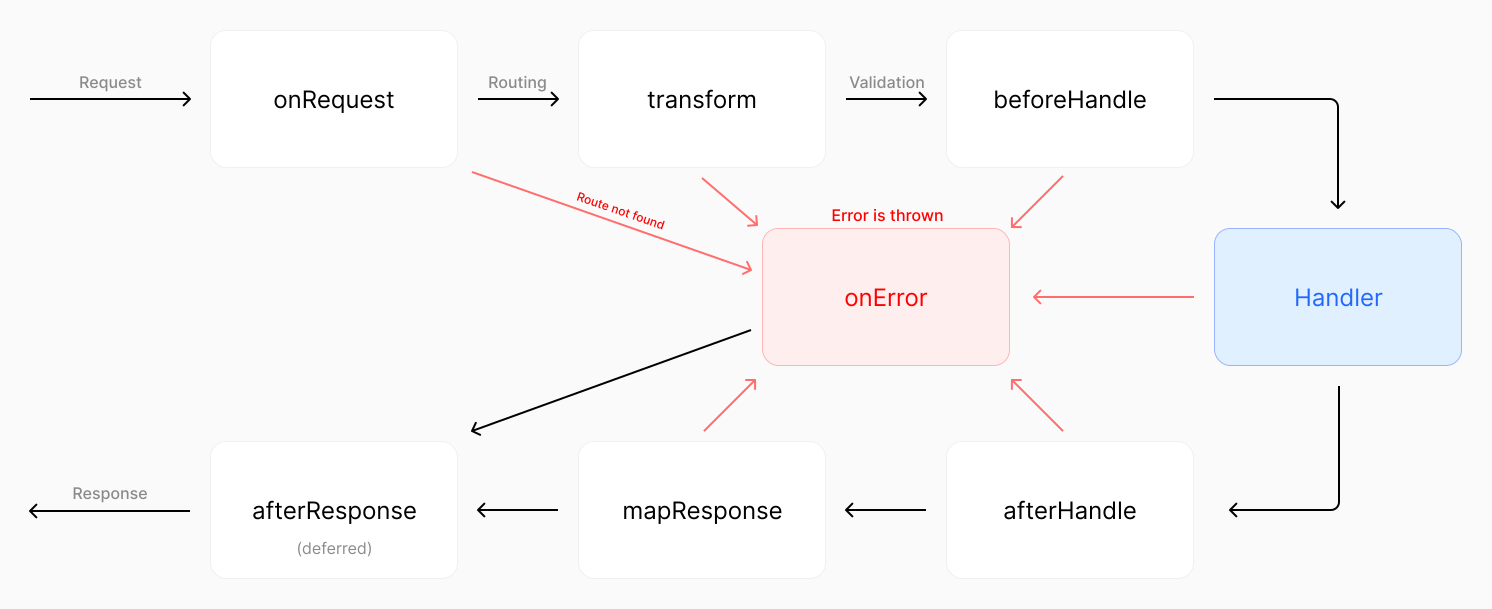
点击图片放大
虽然 Hono 的请求管道按顺序有单一流程,但 Elysia 可以拦截请求管道中的每个事件。
import { Hono } from 'hono'

const app = new Hono()

// 全局中间件
app.use(async (c, next) => {
	console.log(`${c.method} ${c.url}`)

	await next()
})

app.get(
	'/protected',
	// 路由特定的中间件
	async (c, next) => {
	  	const token = c.headers.authorization

	  	if (!token) {
			c.status(401)
	   		return c.text('Unauthorized')
		}

	  	await next()
	},
	(req, res) => {
  		res.send('Protected route')
	}
)
Hono 使用单一队列顺序来执行中间件
import { Elysia } from 'elysia'

const app = new Elysia()
	// 全局中间件
	.onRequest(({ method, path }) => {
		console.log(`${method} ${path}`)
	})
	// 路由特定的中间件
	.get('/protected', () => 'protected', {
		beforeHandle({ status, headers }) {
  			if (!headers.authorizaton)
     			return status(401)
		}
	})
Elysia 为请求管道中的每个点使用特定的事件拦截器
虽然 Hono 有 next 函数来调用下一个中间件,但 Elysia 没有。
Elysia 被设计为具有健全的类型安全。
例如,您可以使用 derive 和 resolve 以类型安全的方式自定义上下文,而 Hono 不能。
import { Hono } from 'hono'
import { createMiddleware } from 'hono/factory'
const app = new Hono()
const getVersion = createMiddleware(async (c, next) => {
c.set('version', 2)
await next()
})
app.use(getVersion)
app.get('/version', getVersion, (c) => {
return c.text(c.get('version') + '')})
const authenticate = createMiddleware(async (c, next) => {
const token = c.req.header('authorization')
if (!token) {
c.status(401)
return c.text('Unauthorized')
}
c.set('token', token.split(' ')[1])
await next()
})
app.post('/user', authenticate, async (c) => {
c.get('version')
return c.text(c.get('token'))})Hono 使用中间件来扩展上下文,但不是类型安全的
import { Elysia } from 'elysia'

const app = new Elysia()
	.decorate('version', 2)
	.get('/version', ({ version }) => version)
	.resolve(({ status, headers: { authorization } }) => {
		if(!authorization?.startsWith('Bearer '))
			return status(401)

		return {
			token: authorization.split(' ')[1]
		}
	})
	.get('/token', ({ token, version }) => {
		version


		return token
	})
Elysia 为请求管道中的每个点使用特定的事件拦截器
虽然 Hono 可以使用 declare module 来扩展 ContextVariableMap 接口,但它是全局可用的,并且不具备健全的类型安全,也不能保证该属性在所有请求处理器中都可用。
declare module 'hono' {
  	interface ContextVariableMap {
    	version: number
  		token: string
  	}
}
这对于上述 Hono 示例的运行是必需的,但它不提供健全的类型安全
Hono 使用回调函数来定义可重用的路由特定中间件,而 Elysia 使用 宏来定义自定义钩子。
import { Hono } from 'hono'
import { createMiddleware } from 'hono/factory'
const app = new Hono()
const role = (role: 'user' | 'admin') => createMiddleware(async (c, next) => {
const user = findUser(c.req.header('Authorization'))
if(user.role !== role) {
c.status(401)
return c.text('Unauthorized')
}
c.set('user', user)
await next()
})
app.get('/user/:id', role('admin'), (c) => {
return c.json(c.get('user'))})Hono 使用回调返回
createMiddleware来创建可重用的中间件,但不是类型安全的
import { Elysia } from 'elysia'

const app = new Elysia()
	.macro({
		role: (role: 'user' | 'admin') => ({
			resolve({ status, headers: { authorization } }) {
				const user = findUser(authorization)

				if(user.role !== role)
					return status(401)

				return {
					user
				}
			}
		})
	})
	.get('/token', ({ user }) => user, {
		role: 'admin'
	})
Elysia 使用宏向自定义中间件传递自定义参数
Hono 提供一个 onError 函数,该函数适用于所有路由,而 Elysia 提供了对错误处理更精细的控制。
import { Hono } from 'hono'

const app = new Hono()

class CustomError extends Error {
	constructor(message: string) {
		super(message)
		this.name = 'CustomError'
	}
}

// 全局错误处理器
app.onError((error, c) => {
	if(error instanceof CustomError) {
		c.status(500)

		return c.json({
			message: 'Something went wrong!',
			error
		})
	}
})

// 路由特定的错误处理器
app.get('/error', (req, res) => {
	throw new CustomError('oh uh')
})
Hono 使用
onError函数处理错误,所有路由共用一个错误处理器
import { Elysia } from 'elysia'

class CustomError extends Error {
	// 可选:自定义 HTTP 状态码
	status = 500

	constructor(message: string) {
		super(message)
		this.name = 'CustomError'
	}

	// 可选:应发送给客户端的内容
	toResponse() {
		return {
			message: "If you're seeing this, our dev forgot to handle this error",
			error: this
		}
	}
}

const app = new Elysia()
	// 可选:注册自定义错误类
	.error({
		CUSTOM: CustomError,
	})
	// 全局错误处理器
	.onError(({ error, code }) => {
		if(code === 'CUSTOM')


			return {
				message: 'Something went wrong!',
				error
			}
	})
	.get('/error', () => {
		throw new CustomError('oh uh')
	}, {
		// 可选:路由特定的错误处理器
		error({ error }) {
			return {
				message: 'Only for this route!',
				error
			}
		}
	})
Elysia 提供更精细的错误处理控制和作用域机制
虽然 Hono 提供类似中间件的错误处理,但 Elysia 提供:
toResponse错误代码对于日志记录和调试很有用,并且在区分扩展同一类的不同错误类型时很重要。
Elysia 以类型安全的方式提供了所有这些,而 Hono 没有。
Hono 封装插件的副作用,而 Elysia 通过显式的作用域机制和代码顺序让您能够控制插件的副作用。
import { Hono } from 'hono'

const subRouter = new Hono()

subRouter.get('/user', (c) => {
	return c.text('Hello User')
})

const app = new Hono()

app.route('/api', subRouter)
Hono 封装了插件的副作用
import { Elysia } from 'elysia'

const subRouter = new Elysia()
	.onBeforeHandle(({ status, headers: { authorization } }) => {
		if(!authorization?.startsWith('Bearer '))
			return status(401)
   	})

const app = new Elysia()
    .get('/', 'Hello World')
    .use(subRouter)
    // 不受 subRouter 的副作用影响
    .get('/side-effect', () => 'hi')
Elysia 封装了插件的副作用,除非明确声明
两者都有插件的封装机制来防止副作用。
然而,Elysia 可以通过声明作用域来明确说明哪个插件应该具有副作用,而 Hono 总是封装它。
import { Elysia } from 'elysia'

const subRouter = new Elysia()
	.onBeforeHandle(({ status, headers: { authorization } }) => {
		if(!authorization?.startsWith('Bearer '))
			return status(401)
   	})
	// 作用于父实例但不影响更上层
	.as('scoped')

const app = new Elysia()
    .get('/', 'Hello World')
    .use(subRouter)
    // 现在受到 subRouter 的副作用影响
    .get('/side-effect', () => 'hi')
Elysia 提供 3 种类型的作用域机制:
由于 Hono 不提供作用域机制,我们需要:
但是,如果处理不当,这可能会导致重复的副作用。
import { Hono } from 'hono'
import { createMiddleware } from 'hono/factory'

const middleware = createMiddleware(async (c, next) => {
	console.log('called')

	await next()
})

const app = new Hono()
const subRouter = new Hono()

app.use(middleware)
app.get('/main', (c) => c.text('Hello from main!'))

subRouter.use(middleware)

// 这将记录两次
subRouter.get('/sub', (c) => c.text('Hello from sub router!'))

app.route('/sub', subRouter)

export default app
在这种情况下,Elysia 提供了插件去重机制来防止重复的副作用。
import { Elysia } from 'elysia'

const subRouter = new Elysia({ name: 'subRouter' })
	.onBeforeHandle(({ status, headers: { authorization } }) => {
		if(!authorization?.startsWith('Bearer '))
			return status(401)
   	})
	.as('scoped')

const app = new Elysia()
	.get('/', 'Hello World')
	.use(subRouter)
	.use(subRouter)
	.use(subRouter)
	.use(subRouter)
	// 副作用只被调用一次
	.get('/side-effect', () => 'hi')
通过使用唯一的 name,Elysia 将只应用一次插件,不会导致重复的副作用。
Hono 在 hono/cookie 下有内置的 cookie 工具函数,而 Elysia 使用基于信号的方法来处理 cookies。
import { Hono } from 'hono'
import { getSignedCookie, setSignedCookie } from 'hono/cookie'

const app = new Hono()

app.get('/', async (c) => {
	const name = await getSignedCookie(c, 'secret', 'name')

	await setSignedCookie(
		c,
		'name',
		'value',
		'secret',
		{
			maxAge: 1000,
		}
	)
})
Hono 使用工具函数来处理 cookies
import { Elysia } from 'elysia'

const app = new Elysia({
	cookie: {
		secret: 'secret'
	}
})
	.get('/', ({ cookie: { name } }) => {
		// 签名验证会自动处理
		name.value

		// cookie 签名会自动签名
		name.value = 'value'
		name.maxAge = 1000 * 60 * 60 * 24
	})
Elysia 使用基于信号的方法来处理 cookies
Hono 需要额外的努力来描述规范,而 Elysia 将规范无缝集成到模式中。
import { Hono } from 'hono'
import { describeRoute, openAPISpecs } from 'hono-openapi'
import { resolver, validator as zodValidator } from 'hono-openapi/zod'
import { swaggerUI } from '@hono/swagger-ui'

import { z } from '@hono/zod-openapi'

const app = new Hono()

const model = z.array(
	z.object({
		name: z.string().openapi({
			description: 'first name only'
		}),
		age: z.number()
	})
)

const detail = await resolver(model).builder()

console.log(detail)

app.post(
	'/',
	zodValidator('json', model),
	describeRoute({
		validateResponse: true,
		summary: 'Create user',
		requestBody: {
			content: {
				'application/json': { schema: detail.schema }
			}
		},
		responses: {
			201: {
				description: 'User created',
				content: {
					'application/json': { schema: resolver(model) }
				}
			}
		}
	}),
	(c) => {
		c.status(201)
		return c.json(c.req.valid('json'))
	}
)

app.get('/ui', swaggerUI({ url: '/doc' }))

app.get(
	'/doc',
	openAPISpecs(app, {
		documentation: {
			info: {
				title: 'Hono API',
				version: '1.0.0',
				description: 'Greeting API'
			},
			components: {
				...detail.components
			}
		}
	})
)

export default app
Hono 需要额外的努力来描述规范
import { Elysia, t } from 'elysia'
import { openapi } from '@elysiajs/openapi'

const app = new Elysia()
	.use(openapi())
	.model({
		user: t.Array(
			t.Object({
				name: t.String(),
				age: t.Number()
			})
		)
	})
	.post('/users', ({ body }) => body, {
		body: 'user',
		response: {
			201: 'user'
		},
		detail: {
			summary: 'Create user'
		}
	})
Elysia 将规范无缝集成到模式中
Hono 有单独的函数来描述路由规范、验证,并且需要一些精力来正确设置。
Elysia 使用您提供的模式来生成 OpenAPI 规范,并验证请求/响应,所有这些都来自单一事实来源,并自动推断类型。
Elysia 还将在 model 中注册的模式附加到 OpenAPI 规范中,允许您在 Swagger 或 Scalar UI 的专用部分引用该模型,而 Hono 则将模式内联到路由中。
两者都基于 Web Standard API 构建,允许它与任何测试库一起使用。
import { Hono } from 'hono'
import { describe, it, expect } from 'vitest'

const app = new Hono()
	.get('/', (c) => c.text('Hello World'))

describe('GET /', () => {
	it('should return Hello World', async () => {
		const res = await app.request('/')

		expect(res.status).toBe(200)
		expect(await res.text()).toBe('Hello World')
	})
})
Hono 有一个内置的
request方法来运行请求
import { Elysia } from 'elysia'
import { describe, it, expect } from 'vitest'

const app = new Elysia()
	.get('/', 'Hello World')

describe('GET /', () => {
	it('should return Hello World', async () => {
		const res = await app.handle(
			new Request('http://localhost')
		)

		expect(res.status).toBe(200)
		expect(await res.text()).toBe('Hello World')
	})
})
Elysia 使用 Web Standard API 来处理请求和响应
或者,Elysia 还提供了一个名为 Eden 的辅助库,用于端到端的类型安全,允许我们通过自动补全和完整的类型安全进行测试。
import { Elysia } from 'elysia'
import { treaty } from '@elysiajs/eden'
import { describe, expect, it } from 'bun:test'

const app = new Elysia().get('/hello', 'Hello World')
const api = treaty(app)

describe('GET /', () => {
	it('should return Hello World', async () => {
		const { data, error, status } = await api.hello.get()

		expect(status).toBe(200)
		expect(data).toBe('Hello World')
	})
})两者都提供端到端的类型安全,但 Hono 似乎不提供基于状态码的类型安全的错误处理。
import { Hono } from 'hono'
import { hc } from 'hono/client'
import { z } from 'zod'
import { zValidator } from '@hono/zod-validator'

const app = new Hono()
	.post(
		'/mirror',
		zValidator(
			'json',
			z.object({
				message: z.string()
			})
		),
		(c) => c.json(c.req.valid('json'))
	)

const client = hc<typeof app>('/')

const response = await client.mirror.$post({
	json: {
		message: 'Hello, world!'
	}
})

const data = await response.json()


console.log(data)
Hono 使用
hc来运行请求,并提供端到端的类型安全
import { Elysia, t } from 'elysia'
import { treaty } from '@elysiajs/eden'

const app = new Elysia()
	.post('/mirror', ({ body }) => body, {
		body: t.Object({
			message: t.String()
		})
	})

const api = treaty(app)

const { data, error } = await api.mirror.post({
	message: 'Hello World'
})

if(error)
	throw error


console.log(data)
Elysia 使用
treaty来运行请求,并提供端到端的类型安全
虽然两者都提供端到端的类型安全,但 Elysia 提供了基于状态码的更类型安全的错误处理,而 Hono 没有。
使用相同的业务代码为每个框架测量类型推断速度,Elysia 的类型检查速度比 Hono 快 2.3 倍。
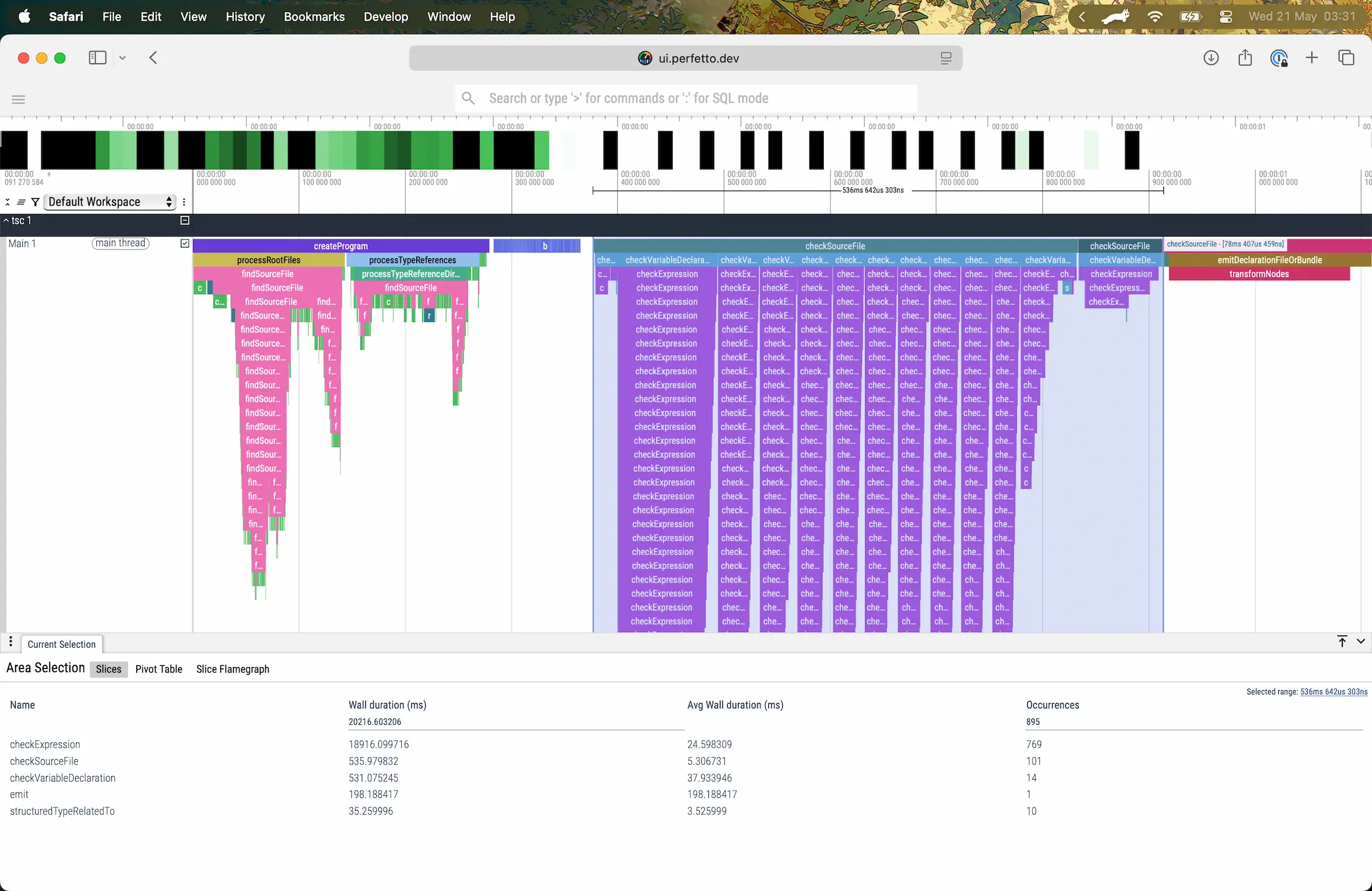
Elysia 耗时 536ms 来推断 Elysia 和 Eden(点击放大)
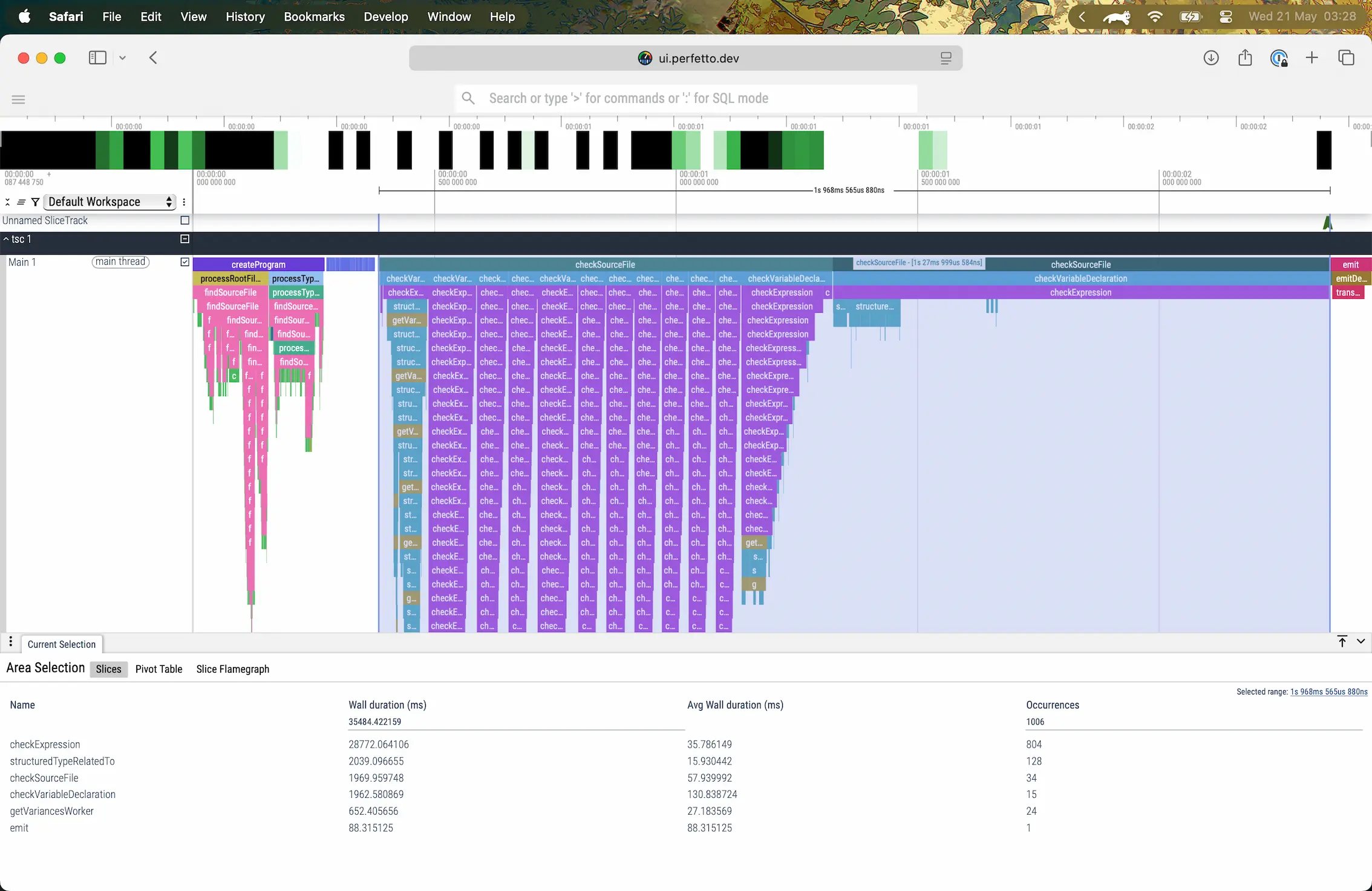
Hono 耗时 1.27s 来推断 Hono 和 HC,但出现错误(中止)(点击放大)
1.27 秒并不反映推理的整个持续时间,而是从开始到因错误 "Type instantiation is excessively deep and possibly infinite." 而中止的持续时间,当模式过大时会发生这种情况。
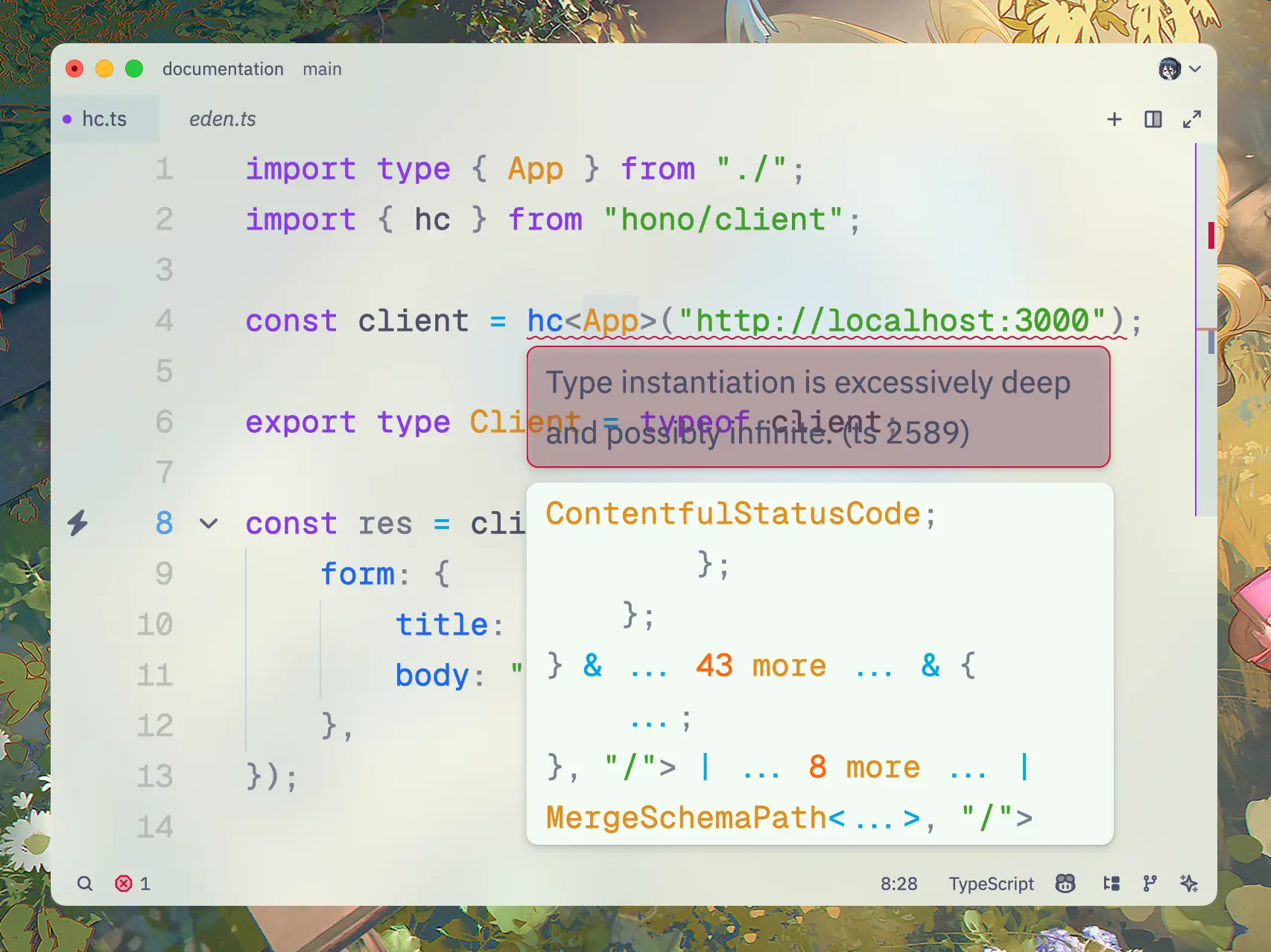
Hono HC 显示深度过度的错误
这是由大型模式引起的,Hono 不支持超过 100 个具有复杂请求体和响应验证的路由,而 Elysia 没有这个问题。
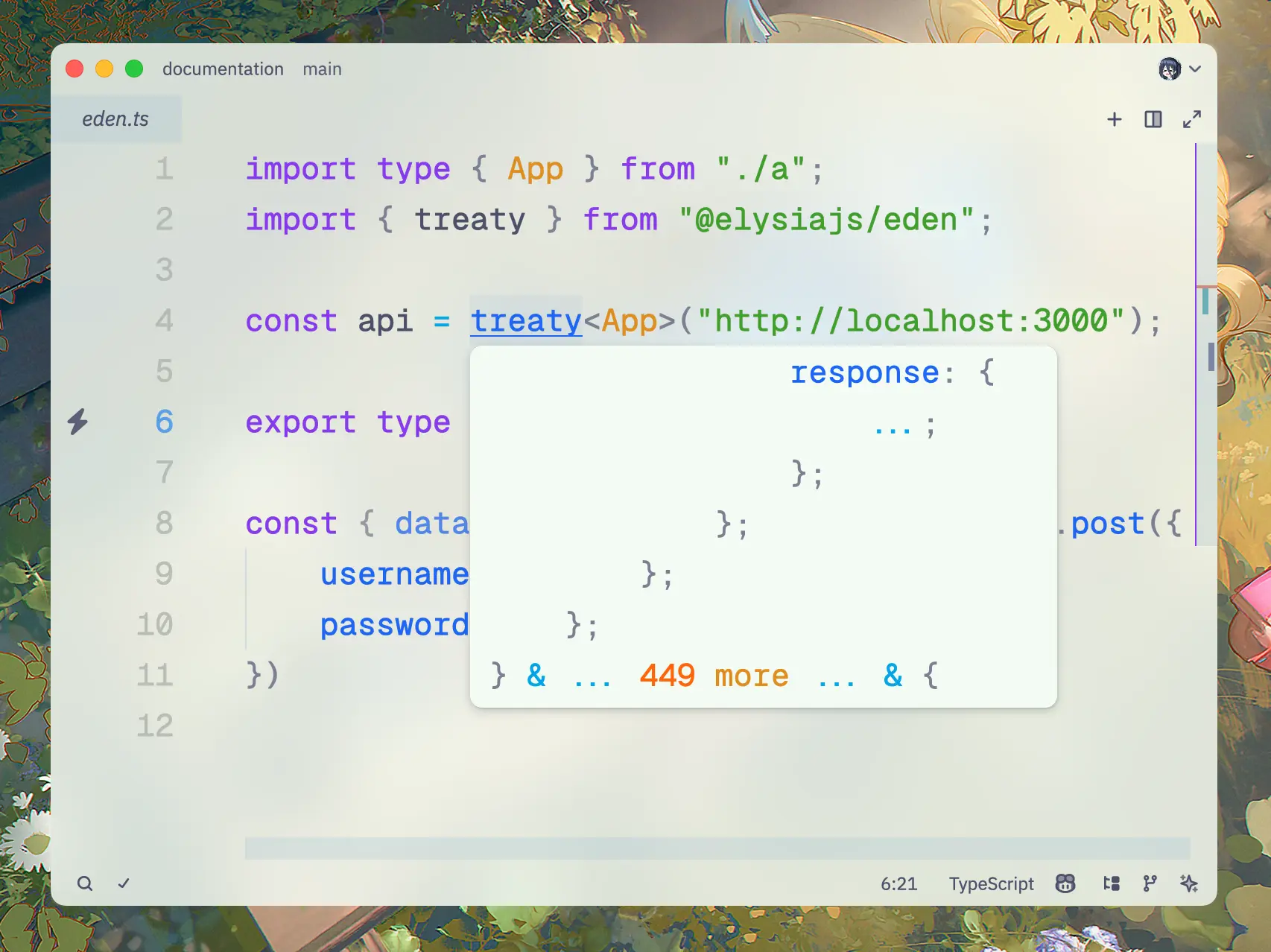
Elysia Eden 代码显示无错误的类型推断
Elysia 具有更快的类型推断性能,并且至少在多达 2000 个具有复杂请求体和响应验证的路由下,都没有 "Type instantiation is excessively deep and possibly infinite." 错误。
如果端到端类型安全对您很重要,那么 Elysia 是正确的选择。
两者都是基于 Web Standard API 构建的新一代 Web 框架,略有差异。
Elysia 旨在符合人体工程学且对开发者友好,专注于健全的类型安全,并且性能优于 Hono。
而 Hono 提供了对多种运行时(尤其是 Cloudflare Workers)的广泛兼容性,以及更庞大的用户基础。
或者,如果您来自其他框架,可以查看: