
Elysia
2,454,631 reqs/sExpress
113,117
以请求/秒为单位测量。结果来自 TechEmpower Benchmark 第 22 轮(2023-10-17)在 PlainText 中
title: 从 Express 迁移 - ElysiaJS prev: text: '快速开始' link: '/quick-start' next: text: '教程' link: '/tutorial' head: - - meta - property: 'og:title' content: 从 Express 迁移 - ElysiaJS
- - meta
  - name: 'description'
    content: 本指南面向 Express 用户,展示与 Express 的差异(包括语法),并通过示例说明如何将应用程序从 Express 迁移到 Elysia。

- - meta
  - property: 'og:description'
    content: 本指南面向 Express 用户,展示与 Express 的差异(包括语法),并通过示例说明如何将应用程序从 Express 迁移到 Elysia。
本指南面向 Express 用户,展示与 Express 的差异(包括语法),并通过示例说明如何将应用程序从 Express 迁移到 Elysia。
Express 是一个流行的 Node.js Web 框架,广泛用于构建 Web 应用程序和 API。它以其简单性和灵活性而闻名。
Elysia 是一个适用于 Bun、Node.js 和支持 Web 标准 API 的运行时的人体工程学 Web 框架。设计注重人体工程学和开发者友好性,重点关注可靠的类型安全和性能。
得益于原生的 Bun 实现和静态代码分析,Elysia 相对于 Express 有显著的性能提升。
113,117
以请求/秒为单位测量。结果来自 TechEmpower Benchmark 第 22 轮(2023-10-17)在 PlainText 中
Express 和 Elysia 有相似的路由语法,使用 app.get() 和 app.post() 方法定义路由,路径参数语法也相似。
import express from 'express'

const app = express()

app.get('/', (req, res) => {
    res.send('Hello World')
})

app.post('/id/:id', (req, res) => {
    res.status(201).send(req.params.id)
})

app.listen(3000)
Express 使用
req和res作为请求和响应对象
import { Elysia } from 'elysia'

const app = new Elysia()
    .get('/', 'Hello World')
    .post(
    	'/id/:id',
     	({ status, params: { id } }) => {
      		return status(201, id)
      	}
    )
    .listen(3000)
Elysia 使用单一的
context并直接返回响应
在风格指南上有轻微不同,Elysia 推荐使用方法链和解构对象。
如果不需要使用 context,Elysia 也支持为响应使用内联值。
两者都有相似的属性来访问输入参数,如 headers、query、params 和 body。
import express from 'express'

const app = express()

app.use(express.json())

app.post('/user', (req, res) => {
    const limit = req.query.limit
    const name = req.body.name
    const auth = req.headers.authorization

    res.json({ limit, name, auth })
})
Express 需要
express.json()中间件来解析 JSON 主体
import { Elysia } from 'elysia'

const app = new Elysia()
	.post('/user', (ctx) => {
	    const limit = ctx.query.limit
	    const name = ctx.body.name
	    const auth = ctx.headers.authorization

	    return { limit, name, auth }
	})
Elysia 默认解析 JSON、URL 编码数据和表单数据
Express 使用专用的 express.Router() 来声明子路由,而 Elysia 将每个实例视为可以即插即用的组件。
import express from 'express'

const subRouter = express.Router()

subRouter.get('/user', (req, res) => {
	res.send('Hello User')
})

const app = express()

app.use('/api', subRouter)
Express 使用
express.Router()创建子路由
import { Elysia } from 'elysia'

const subRouter = new Elysia({ prefix: '/api' })
	.get('/user', 'Hello User')

const app = new Elysia()
	.use(subRouter)
Elysia 将每个实例视为组件
Elysia 内置支持使用 TypeBox 实现类型安全的请求验证,并开箱即用地支持标准架构,允许您使用喜欢的库,如 Zod、Valibot、ArkType、Effect Schema 等。而 Express 不提供内置验证,需要根据每个验证库进行手动类型声明。
import express from 'express'
import { z } from 'zod'

const app = express()

app.use(express.json())

const paramSchema = z.object({
	id: z.coerce.number()
})

const bodySchema = z.object({
	name: z.string()
})

app.patch('/user/:id', (req, res) => {
	const params = paramSchema.safeParse(req.params)
	if (!params.success)
		return res.status(422).json(result.error)

	const body = bodySchema.safeParse(req.body)
	if (!body.success)
		return res.status(422).json(result.error)

	res.json({
		params: params.id.data,
		body: body.data
	})
})
Express 需要外部验证库如
zod或joi来验证请求主体
import { Elysia, t } from 'elysia'

const app = new Elysia()
	.patch('/user/:id', ({ params, body }) => ({
		params,
		body
	}),


	{
		params: t.Object({
			id: t.Number()
		}),
		body: t.Object({
			name: t.String()
		})
})import { Elysia } from 'elysia'
import { z } from 'zod'
const app = new Elysia()
.patch('/user/:id', ({ params, body }) => ({
params,
body
}),
{
params: z.object({
id: z.number()
}),
body: z.object({
name: z.string()
})
})import { Elysia } from 'elysia'
import * as v from 'valibot'
const app = new Elysia()
.patch('/user/:id', ({ params, body }) => ({
params,
body
}),
{
params: v.object({
id: v.number()
}),
body: v.object({
name: v.string()
})
})Elysia 使用 TypeBox 进行验证,并自动强制转换类型。同时支持各种验证库如 Zod、Valibot,语法相同。
Express 使用外部库 multer 处理文件上传,而 Elysia 内置支持文件和表单数据,使用声明式 API 进行 mimetype 验证。
import express from 'express'
import multer from 'multer'
import { fileTypeFromFile } from 'file-type'
import path from 'path'

const app = express()
const upload = multer({ dest: 'uploads/' })

app.post('/upload', upload.single('image'), async (req, res) => {
	const file = req.file

	if (!file)
		return res
			.status(422)
			.send('No file uploaded')

	const type = await fileTypeFromFile(file.path)
	if (!type || !type.mime.startsWith('image/'))
		return res
			.status(422)
			.send('File is not a valid image')

	const filePath = path.resolve(file.path)
	res.sendFile(filePath)
})
Express 需要
express.json()中间件来解析 JSON 主体
import { Elysia, t } from 'elysia'

const app = new Elysia()
	.post('/upload', ({ body }) => body.file, {
		body: t.Object({
			file: t.File({
				type: 'image'
			})
		})
	})
Elysia 声明式地处理文件和 mimetype 验证
由于 multer 不验证 mimetype,您需要使用 file-type 或类似库手动验证 mimetype。
Elysia 验证文件上传,并使用 file-type 自动验证 mimetype。
Express 中间件使用单一基于队列的顺序,而 Elysia 通过基于事件的生命周期为您提供更精细的控制。
Elysia 的生命周期事件可以如下所示。 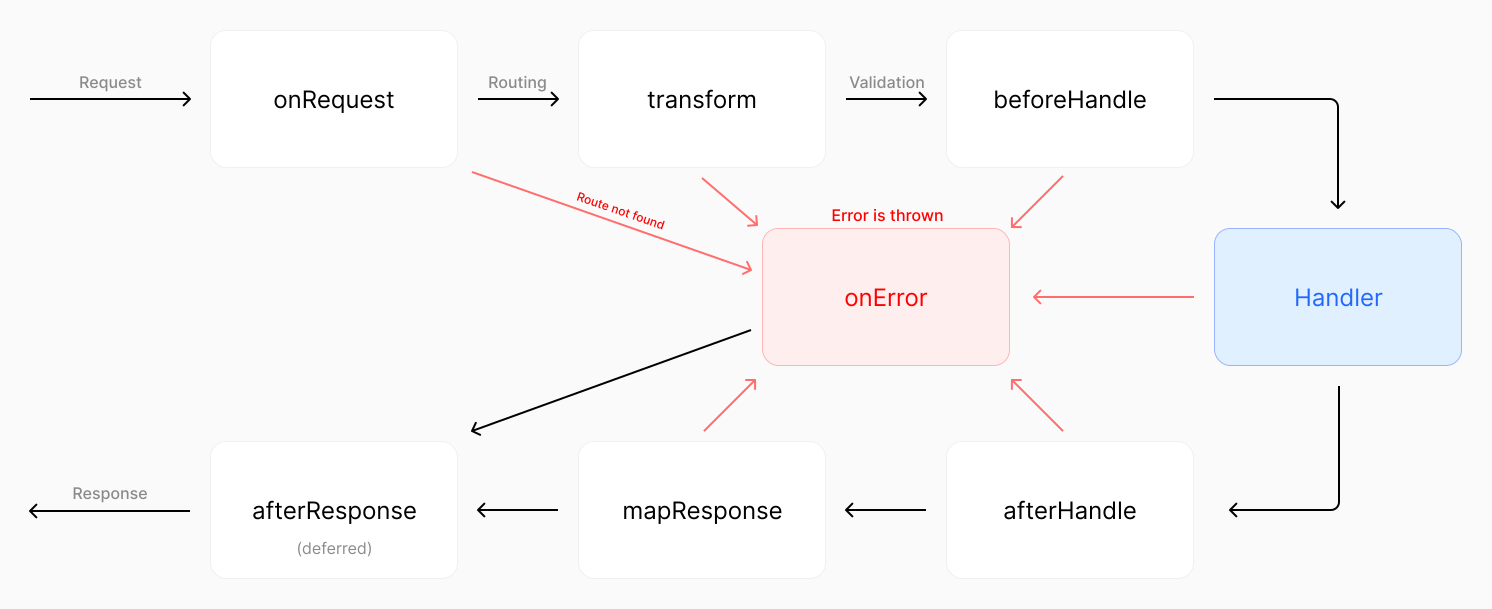
点击图像放大
虽然 Express 有一个按顺序的请求管道单一流程,但 Elysia 可以拦截请求管道中的每个事件。
import express from 'express'

const app = express()

// 全局中间件
app.use((req, res, next) => {
	console.log(`${req.method} ${req.url}`)
	next()
})

app.get(
	'/protected',
	// 路由特定中间件
	(req, res, next) => {
	  	const token = req.headers.authorization

	  	if (!token)
	   		return res.status(401).send('Unauthorized')

	  	next()
	},
	(req, res) => {
  		res.send('Protected route')
	}
)
Express 使用单一基于队列的中间件顺序,按顺序执行
import { Elysia } from 'elysia'

const app = new Elysia()
	// 全局中间件
	.onRequest(({ method, path }) => {
		console.log(`${method} ${path}`)
	})
	// 路由特定中间件
	.get('/protected', () => 'protected', {
		beforeHandle({ status, headers }) {
  			if (!headers.authorizaton)
     			return status(401)
		}
	})
Elysia 为请求管道中的每个点使用特定的事件拦截器
虽然 Express 有 next 函数来调用下一个中间件,但 Elysia 没有。
Elysia 被设计为具有可靠的类型安全。
例如,您可以使用 derive 和 resolve 以类型安全的方式自定义 context,而 Express 不能。
import express from 'express'
import type { Request, Response } from 'express'
const app = express()
const getVersion = (req: Request, res: Response, next: Function) => {
// @ts-ignore
req.version = 2
next()
}
app.get('/version', getVersion, (req, res) => {
res.send(req.version)})
const authenticate = (req: Request, res: Response, next: Function) => {
const token = req.headers.authorization
if (!token)
return res.status(401).send('Unauthorized')
// @ts-ignore
req.token = token.split(' ')[1]
next()
}
app.get('/token', getVersion, authenticate, (req, res) => {
req.version
res.send(req.token)})Express 使用单一基于队列的中间件顺序,按顺序执行
import { Elysia } from 'elysia'

const app = new Elysia()
	.decorate('version', 2)
	.get('/version', ({ version }) => version)
	.resolve(({ status, headers: { authorization } }) => {
		if(!authorization?.startsWith('Bearer '))
			return status(401)

		return {
			token: authorization.split(' ')[1]
		}
	})
	.get('/token', ({ token, version }) => {
		version


		return token
	})
Elysia 为请求管道中的每个点使用特定的事件拦截器
虽然 Express 可以使用 declare module 扩展 Request 接口,但它是全局可用的,没有可靠的类型安全,并且不保证该属性在所有请求处理器中都可用。
declare module 'express' {
  	interface Request {
    	version: number
  		token: string
  	}
}
这是上述 Express 示例工作所必需的,但它不提供可靠的类型安全
Express 使用返回插件的函数来定义可重用的路由特定中间件,而 Elysia 使用 macro 来定义自定义钩子。
import express from 'express'
import type { Request, Response } from 'express'
const app = express()
const role = (role: 'user' | 'admin') =>
(req: Request, res: Response, next: Function) => {
const user = findUser(req.headers.authorization)
if (user.role !== role)
return res.status(401).send('Unauthorized')
// @ts-ignore
req.user = user
next()
}
app.get('/token', role('admin'), (req, res) => {
res.send(req.user)})Express 使用函数回调来接受中间件的自定义参数
import { Elysia } from 'elysia'

const app = new Elysia()
	.macro({
		role: (role: 'user' | 'admin') => ({
			resolve({ status, headers: { authorization } }) {
				const user = findUser(authorization)

				if(user.role !== role)
					return status(401)

				return {
					user
				}
			}
		})
	})
	.get('/token', ({ user }) => user, {
		role: 'admin'
	})
Elysia 使用宏将自定义参数传递给自定义中间件
Express 对所有路由使用单一错误处理器,而 Elysia 提供了对错误处理更精细的控制。
import express from 'express'

const app = express()

class CustomError extends Error {
	constructor(message: string) {
		super(message)
		this.name = 'CustomError'
	}
}

// 全局错误处理器
app.use((error, req, res, next) => {
	if(error instanceof CustomError) {
		res.status(500).json({
			message: 'Something went wrong!',
			error
		})
	}
})

// 路由特定错误处理器
app.get('/error', (req, res) => {
	throw new CustomError('oh uh')
})
Express 使用中间件处理错误,所有路由使用单一错误处理器
import { Elysia } from 'elysia'

class CustomError extends Error {
	// 可选:自定义 HTTP 状态码
	status = 500

	constructor(message: string) {
		super(message)
		this.name = 'CustomError'
	}

	// 可选:应该发送给客户端的内容
	toResponse() {
		return {
			message: "If you're seeing this, our dev forgot to handle this error",
			error: this
		}
	}
}

const app = new Elysia()
	// 可选:注册自定义错误类
	.error({
		CUSTOM: CustomError,
	})
	// 全局错误处理器
	.onError(({ error, code }) => {
		if(code === 'CUSTOM')


			return {
				message: 'Something went wrong!',
				error
			}
	})
	.get('/error', () => {
		throw new CustomError('oh uh')
	}, {
		// 可选:路由特定错误处理器
		error({ error }) {
			return {
				message: 'Only for this route!',
				error
			}
		}
	})
Elysia 提供对错误处理更精细的控制和作用域机制
虽然 Express 使用中间件提供错误处理,但 Elysia 提供:
toResponse错误代码对于日志记录和调试很有用,在区分扩展同一类的不同错误类型时很重要。
Elysia 在提供所有这些功能的同时保持类型安全,而 Express 不能。
Express 中间件是全局注册的,而 Elysia 通过显式的作用域机制和代码顺序让您控制插件的副作用。
import express from 'express'

const app = express()

app.get('/', (req, res) => {
	res.send('Hello World')
})

const subRouter = express.Router()

subRouter.use((req, res, next) => {
	const token = req.headers.authorization

	if (!token)
		return res.status(401).send('Unauthorized')

	next()
})

app.use(subRouter)

// 受到 subRouter 的副作用影响
app.get('/side-effect', (req, res) => {
	res.send('hi')
})
Express 不处理中间件的副作用,需要前缀来分离副作用
import { Elysia } from 'elysia'

const subRouter = new Elysia()
	.onBeforeHandle(({ status, headers: { authorization } }) => {
		if(!authorization?.startsWith('Bearer '))
			return status(401)
   	})

const app = new Elysia()
    .get('/', 'Hello World')
    .use(subRouter)
    // 不受 subRouter 的副作用影响
    .get('/side-effect', () => 'hi')
Elysia 将副作用封装到插件中
默认情况下,Elysia 会将生命周期事件和 context 封装到使用的实例中,因此插件的副作用不会影响父实例,除非明确说明。
import { Elysia } from 'elysia'

const subRouter = new Elysia()
	.onBeforeHandle(({ status, headers: { authorization } }) => {
		if(!authorization?.startsWith('Bearer '))
			return status(401)
   	})
	// 作用域到父实例但不超出范围
	.as('scoped')

const app = new Elysia()
    .get('/', 'Hello World')
    .use(subRouter)
    // 现在受到 subRouter 的副作用影响
    .get('/side-effect', () => 'hi')
Elysia 提供 3 种类型的作用域机制:
虽然 Express 可以通过添加前缀来作用域中间件副作用,但这不是真正的封装。副作用仍然存在,但分离到任何以该前缀开头的路由,增加了开发者记忆哪些前缀有副作用的心理负担。
您可以执行以下操作:
这可能导致调试的噩梦场景,因为 Express 不提供真正的封装。
Express 使用外部库 cookie-parser 解析 cookie,而 Elysia 内置支持 cookie 并使用基于信号的方法处理 cookie。
import express from 'express'
import cookieParser from 'cookie-parser'

const app = express()

app.use(cookieParser('secret'))

app.get('/', function (req, res) {
	req.cookies.name
	req.signedCookies.name

	res.cookie('name', 'value', {
		signed: true,
		maxAge: 1000 * 60 * 60 * 24
	})
})
Express 使用
cookie-parser解析 cookie
import { Elysia } from 'elysia'

const app = new Elysia({
	cookie: {
		secret: 'secret'
	}
})
	.get('/', ({ cookie: { name } }) => {
		// 签名验证自动处理
		name.value

		// cookie 签名自动签名
		name.value = 'value'
		name.maxAge = 1000 * 60 * 60 * 24
	})
Elysia 使用基于信号的方法处理 cookie
Express 需要为 OpenAPI、验证和类型安全分别配置,而 Elysia 使用架构作为单一事实来源内置支持 OpenAPI。
import express from 'express'

import swaggerUi from 'swagger-ui-express'

const app = express()
app.use(express.json())

app.post('/users', (req, res) => {
	// TODO: 验证请求主体
	res.status(201).json(req.body)
})

const swaggerSpec = {
	openapi: '3.0.0',
	info: {
		title: 'My API',
		version: '1.0.0'
	},
	paths: {
		'/users': {
			post: {
				summary: 'Create user',
				requestBody: {
					content: {
						'application/json': {
							schema: {
								type: 'object',
								properties: {
									name: {
										type: 'string',
										description: 'First name only'
									},
									age: { type: 'integer' }
								},
								required: ['name', 'age']
							}
						}
					}
				},
				responses: {
					'201': {
						description: 'User created'
					}
				}
			}
		}
	}
}

app.use('/docs', swaggerUi.serve, swaggerUi.setup(swaggerSpec))
Express 需要为 OpenAPI、验证和类型安全分别配置
import { Elysia, t } from 'elysia'
import { openapi } from '@elysiajs/openapi'

const app = new Elysia()
	.use(openapi())
	.model({
		user: t.Array(
			t.Object({
				name: t.String(),
				age: t.Number()
			})
		)
	})
	.post('/users', ({ body }) => body, {
		body: 'user',
		response: {
			201: 'user'
		},
		detail: {
			summary: 'Create user'
		}
	})
Elysia 使用架构作为单一事实来源
Elysia 将根据您提供的架构生成 OpenAPI 规范,并根据架构验证请求和响应,并自动推断类型。
Elysia 还将在 model 中注册的架构附加到 OpenAPI 规范,允许您在 Swagger 或 Scalar UI 的专用部分引用模型。
Express 使用单一的 supertest 库测试应用程序,而 Elysia 构建在 Web 标准 API 之上,允许它与任何测试库一起使用。
import express from 'express'
import request from 'supertest'
import { describe, it, expect } from 'vitest'

const app = express()

app.get('/', (req, res) => {
	res.send('Hello World')
})

describe('GET /', () => {
	it('should return Hello World', async () => {
		const res = await request(app).get('/')

		expect(res.status).toBe(200)
		expect(res.text).toBe('Hello World')
	})
})
Express 使用
supertest库测试应用程序
import { Elysia } from 'elysia'
import { describe, it, expect } from 'vitest'

const app = new Elysia()
	.get('/', 'Hello World')

describe('GET /', () => {
	it('should return Hello World', async () => {
		const res = await app.handle(
			new Request('http://localhost')
		)

		expect(res.status).toBe(200)
		expect(await res.text()).toBe('Hello World')
	})
})
Elysia 使用 Web 标准 API 处理请求和响应
或者,Elysia 还提供了一个名为 Eden 的辅助库,用于端到端类型安全,允许我们使用自动补全和完整的类型安全进行测试。
import { Elysia } from 'elysia'
import { treaty } from '@elysiajs/eden'
import { describe, expect, it } from 'bun:test'

const app = new Elysia().get('/hello', 'Hello World')
const api = treaty(app)

describe('GET /', () => {
	it('should return Hello World', async () => {
		const { data, error, status } = await api.hello.get()

		expect(status).toBe(200)
		expect(data).toBe('Hello World')
	})
})Elysia 使用 Eden 提供端到端类型安全的内置支持,无需代码生成,Express 不提供此功能。
import { Elysia, t } from 'elysia'
import { treaty } from '@elysiajs/eden'

const app = new Elysia()
	.post('/mirror', ({ body }) => body, {
		body: t.Object({
			message: t.String()
		})
	})

const api = treaty(app)

const { data, error } = await api.mirror.post({
	message: 'Hello World'
})

if(error)
	throw error


console.log(data)
如果端到端类型安全对您很重要,那么 Elysia 是正确的选择。
Elysia 提供了更符合人体工程学和开发者友好的体验,重点关注性能、类型安全和简单性,而 Express 是一个流行的 Node.js Web 框架,但在性能和简单性方面存在一些限制。
如果您正在寻找一个易于使用、具有出色开发者体验并构建在 Web 标准 API 之上的框架,Elysia 是您的正确选择。
或者,如果您来自不同的框架,您可以查看: